Gimao Memos: Your Pocket-Sized Private Secure Knowledge Base
Table of Contents
I. Core Positioning
Gimao Memos is an Android version developed by Gimao Technology based on the open-source project Memos. Built on the Mobile-Hosted architecture, it breaks the data cloud storage model of traditional SaaS note-taking apps, allowing ordinary users to turn their mobile phones into “exclusive private cloud servers” without technical thresholds. It achieves 100% local data management, enabling users to truly master data sovereignty.
As a practitioner of open-source philosophy, Gimao Memos is compiled from the official stable version of Memos source code with zero modifications and zero risks. It retains the transparency and freedom of open-source software while optimizing the mobile user experience, making the concept of “everyone mastering the power of open-source” a reality in daily note-taking scenarios.
II. Core Feature Highlights
1. Data Security: 100% Self-Controlled
- Local Storage, Zero Privacy Leakage: All note data is stored in the phone’s local database with no cloud upload process, avoiding the risk of leakage and review by third-party platforms;
- Flexible Backup & Recovery: Supports one-click data export (generates an exclusive download URL for direct access and download via computers on the same LAN) and quick restoration of historical data through the “Data Management” feature;
- Independent Account Management: Initial account information is displayed on the “Multi-Device Sync” page. Users can reset the username (default: admin) and random password to prevent unauthorized access.
2. Multi-Device Sync: Free Access Within Local Network
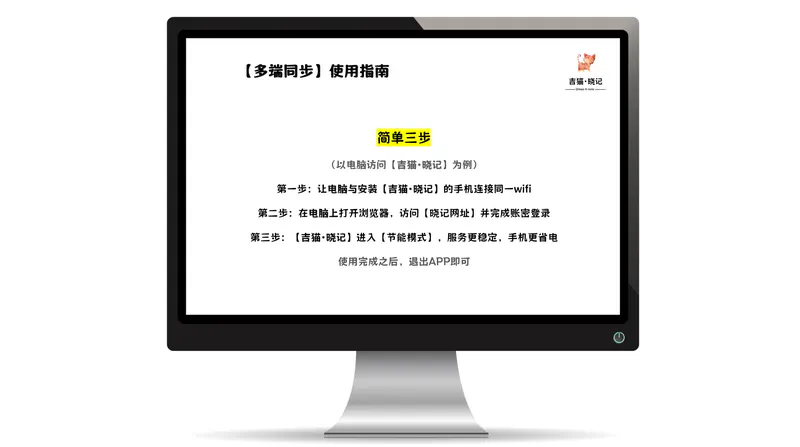
No public network or server required - achieve multi-device collaboration in just 3 steps:
- Connect your phone to a computer/tablet via the same WIFI;
- Enable “Multi-Device Sync” on your phone to get the service URL and account;
- Open the URL in a browser on your computer, log in, and start managing notes. You can enable “Power Saving Mode” on your phone to ensure stable service and energy efficiency.
3. Note-Taking Experience: Lightweight, Efficient, and Flexible Format Support
- Full Markdown Support: Natively supports headings, lists, code blocks (syntax highlighting), tables, image/link embedding, etc., meeting diverse needs from simple notes to technical documentation;
- Multimedia & Tag Management: Supports inserting images and attachments. Classify notes with custom tags and quickly locate content using the “Pin” and “Search” features;
- To-Do List Function: Add to-do items with real-time sync of checkmark status, ideal for daily planning and task management.
4. Zero-Threshold Usage: No Technical Background Required
- No Registration, Ready-to-Use: No personal information required after downloading the app - start creating notes immediately with no data collection;
- No Command-Line Deployment: No Docker or server configuration needed. Enable the service with one click on your phone, making it easy for beginners to use;
- Mobile Background Optimization: Optimized for Android devices to ensure stable background service, avoiding frequent disconnections and guaranteeing smooth multi-device access.
III. Quick Start Guide
1. Basic Getting Started Process
| Step | Operation Instructions |
|---|---|
| 1. Download & Install | Download the latest version from Gimao Technology’s official website (https://www.gimao.space/), Tencent AppGallery, Yingyonghui, etc. (Supports Android 7.0+, file size: 48.22MB); |
| 2. Create Notes | Open the app and click “New” to create notes in plain text or Markdown format. Add tags and to-dos as needed; |
| 3. Multi-Device Access | Go to the “Multi-Device Sync” page, follow the prompts to connect devices to the same network and log in to manage notes on your computer. |
2. Key Operation Demonstrations
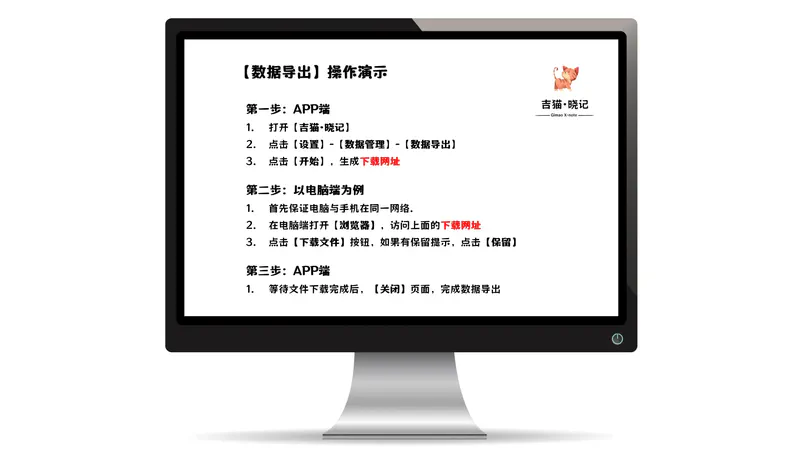
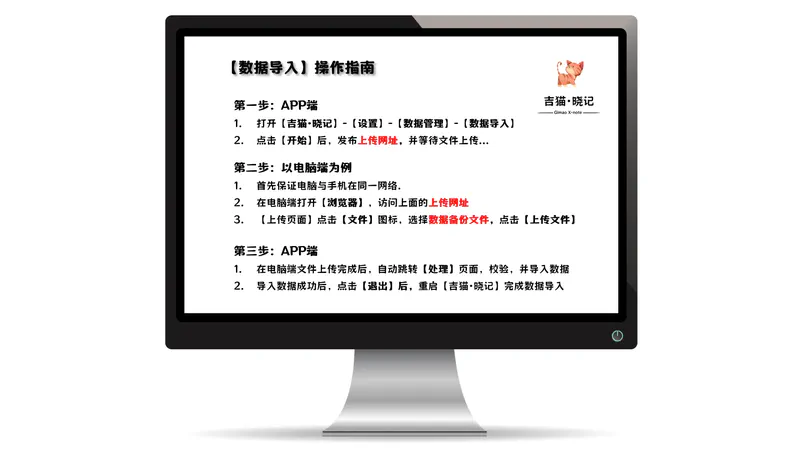
(1) Data Export
- App Side: “Settings” → “Data Management” → “Data Export” → Click “Start” to generate a download URL;
- Computer Side: Open the URL in a browser and click “Download File” to save the backup (requires the same network);
- After Completion: Close the export page on the app to avoid resource consumption.
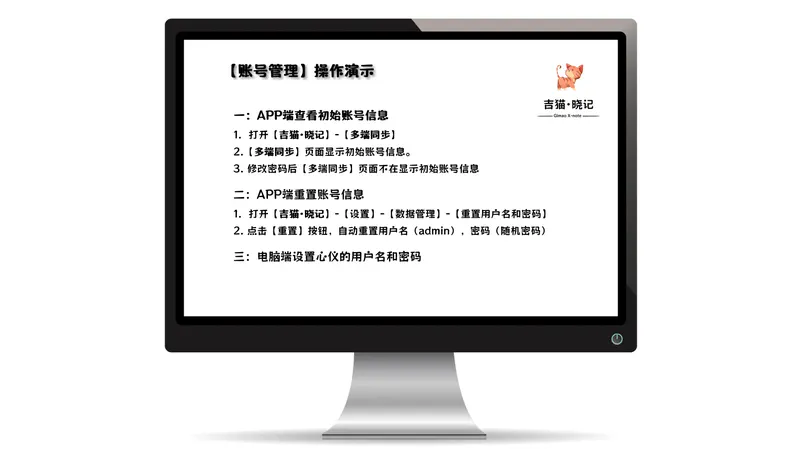
(2) Account Reset
- Go to “Settings” → “Data Management” → “Reset Username and Password”;
- Click “Reset” - the system will automatically generate a new password (stored only locally on your phone);
- Modify it to a custom username and password after logging in on your computer.
IV. Real User Reviews
1. Freelance Writer @ Wu Zixuan
Gimao Memos turns old phones into “mobile resource libraries”: Record writing inspiration with voice notes, take photos and upload them, and write drafts even without the internet. Export Markdown directly to publish on WeChat Official Account and Zhihu with perfect formatting. Open-source + free - all income goes to your own pocket. Truly a must-have tool for digital nomads!
2. Student @ Li Siyuan
I used to think setting up a “private cloud” was only for top students, but now you can do it with just an app! Back up courseware and review materials to the dormitory WIFI with one click - access them instantly even offline. Share notes with the group at the end of the semester, eliminating the need for USB drives. Gimao Memos makes “open-source” no longer exclusive to geeks.
3. DevOps Engineer @ Chen Junjie
Running a “private cloud” on a phone? I thought it was a toy at first, but it’s surprisingly useful! No Docker required - the app sets up WebDAV and note services with one click. Access it securely from outside the local network using Tailscale. Now I leave my old Android phone in the computer room as an edge node with almost zero electricity cost.
V. Frequently Asked Questions (FAQ)
Q1: Do I need an internet connection to use it?
A: No internet required! Core features (note creation, local storage, multi-device sync within the local network) support offline use. An internet connection is only needed for downloading the app.
Q2: Which devices are supported?
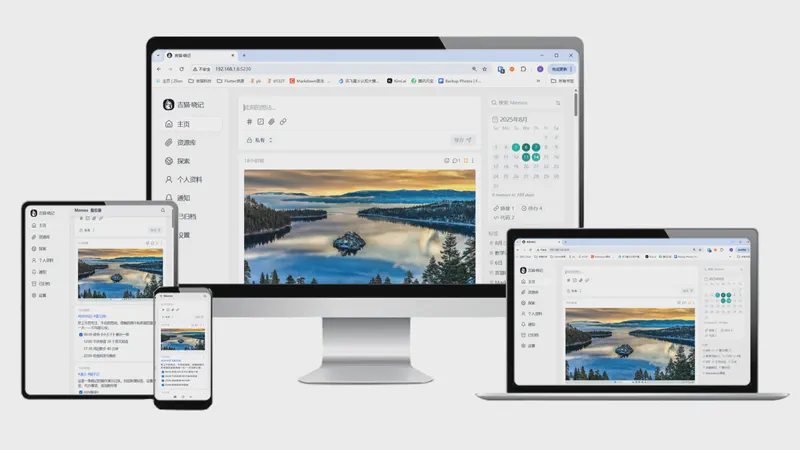
A: The mobile phone (Android 7.0+) is the core device. Computers (Windows/macOS/Linux) and tablets can access it via a browser (requires the same network as the phone).
Q3: Will data be lost if the phone is damaged?
A: It is recommended to regularly back up data to a computer/mobile hard disk using the “Data Export” feature. Backup files are in a universal format and can be opened in other Markdown-supported tools.
Q4: What’s the difference from the original Memos?
A: Gimao Memos is an Android-optimized version of Memos. It retains all core features while adding mobile background optimization, simplified operation processes, and mobile screen adaptation - no manual service deployment required.
VI. Get Started Now
Say goodbye to privacy leaks and subscription traps, and embrace the era of data freedom:
- Download Channels: Gimao Official Website (www.gimao.space/), Tencent AppGallery, and major mobile app stores (search for “Gimao Memos”);
- System Requirements: Android 7.0 or higher, storage space ≥100MB (including cache);
- Open-Source Statement: Developed based on the Memos open-source project (MIT License). Source code is available on GitHub to ensure transparency and security.