Gimao Memo Data Export Guide

Gimao Memo Data Export Guide

Table of Contents

Step 1: Open Data Export on the Mobile App

Step 2: Save Data Backup Files (PC Example)

Step 3: Exit Data Export on the Mobile App

Congratulations: Data exported successfully!

member photo member photo member photo member photo member photo

Get Started now

Say goodbye to privacy breaches and embrace an efficient and secure digital life. Start your era of data freedom now!

Tags :
Auto-Fill Passwords for Study Accounts

In the era of digital learning, we …

Efficient Documentation Method for Whiteboard Discussions Cover Image
Memos
Efficient Documentation Method for Whiteboard Discussions

In daily work, small-scale whiteboard …

Gimao Memo Operation Guide Cover Image
Gimao Memo
Gimao Memo Operation Guide

Step-by-step guide to Gimao Memo: add …

Gimao Memo Data Import Guide Cover Image
Gimao Memo
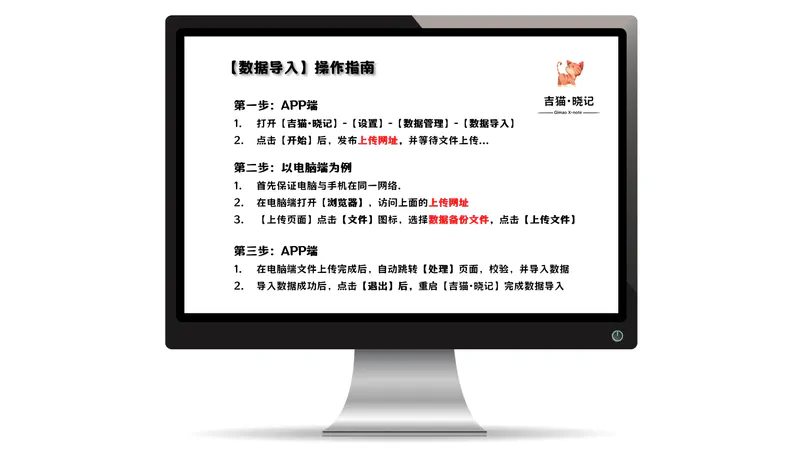
Gimao Memo Data Import Guide

Step 1: Initiate Data Import on the …

Gimao Memo Cross-Device Sync Introduction Cover Image
Gimao Memo
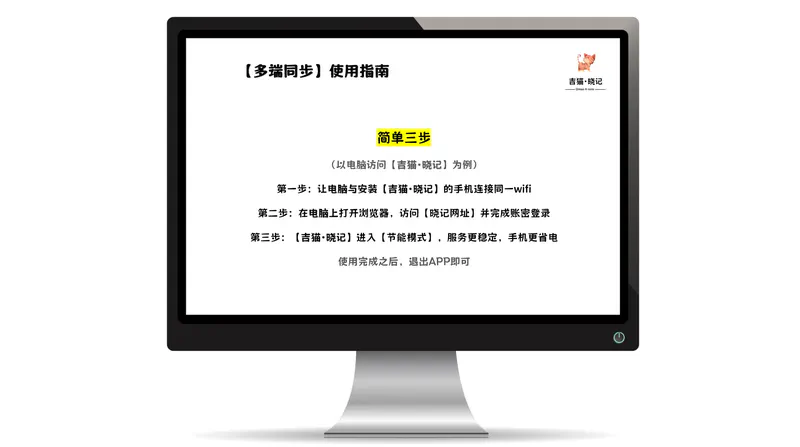
Gimao Memo Cross-Device Sync Introduction

Step 1: Connect your computer and the …