Gimao Memos Product Comparison
Table of Contents
Gimao Memos vs Mainstream Note-Taking Tools: The Best Data Security Choice for Average Users
I. Introduction: Pain Points of Note-Taking Tools for Average Users & A New Option
Have you ever encountered these troubles when using note-taking tools?
- Using SaaS cloud notes (e.g., Evernote, Notion): Free versions have limited features, premium functions require annual subscriptions, and diaries, work data are stored on others’ servers—always worrying about privacy leaks;
- Wanting to try private cloud notes: Heard you need to buy NAS devices and do technical configurations, which is too difficult for non-technical average users to even attempt.
Based on the Mobile-Hosted Architecture, Gimao Memos solves these problems perfectly—no extra cost, no technical skills required, turning your mobile phone into an “exclusive private cloud” with 100% local data storage and simple multi-device access. This article is specifically for average users, comparing Gimao Memos with two types of commonly used tools in plain language to help you quickly choose the right note-taking solution.
II. Comparison Framework: 5 Core Dimensions Average Users Care About
No need to get stuck on complex parameters. Focus on 5 key questions from daily usage scenarios to choose the right tool:
| Comparison Dimension | Plain Language Explanation (Easy for Average Users to Understand) |
|---|---|
| Where is data stored? | Are notes/files stored on your phone or someone else’s server? |
| How much does it cost? | Are there subscription fees, do you need to buy extra devices, and is the long-term cost high? |
| Is it easy to use? | Can you use it directly after downloading, do you need complex settings, and is computer/tablet access convenient? |
| Can it be used offline? | Can you view and edit notes when there’s no signal or internet? |
| Is data secure? | Will it leak, can you back it up yourself, and will data be lost if you change devices/uninstall the app? |
III. In-Depth Comparison: Gimao Memos vs Two Types of Mainstream Tools
1. Gimao Memos vs Traditional SaaS Cloud Notes (Evernote, Notion, Yuque)
These tools are the most commonly used, with instant access after registering an account. However, their core issue is “data stored on the vendor’s cloud” and ongoing subscription costs for long-term use.
Core Difference Comparison Table
| Comparison Dimension | Gimao Memos | Traditional SaaS Cloud Notes (e.g., Evernote) |
|---|---|---|
| Where is data stored? | Local to your phone—only stored on your device, no cloud uploads | Vendor’s servers (e.g., Evernote’s cloud), data controlled by the platform |
| How much does it cost? | Completely free: No subscription fees, no ads, no extra device purchases | Free version limited (e.g., Evernote Free has only 60MB monthly uploads), premium features cost ¥98-198/year |
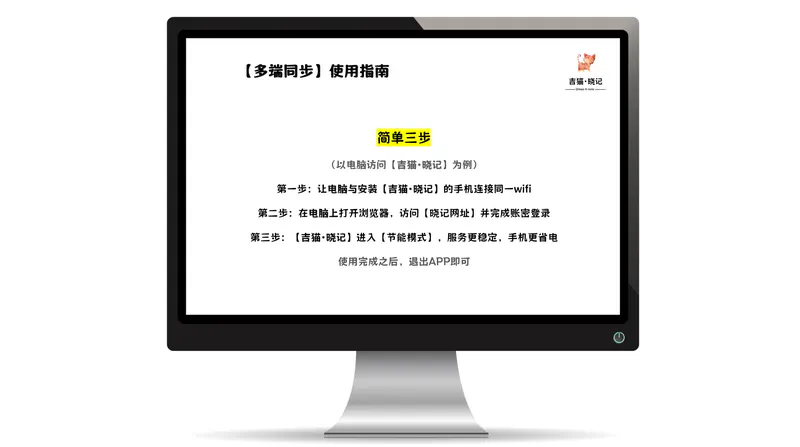
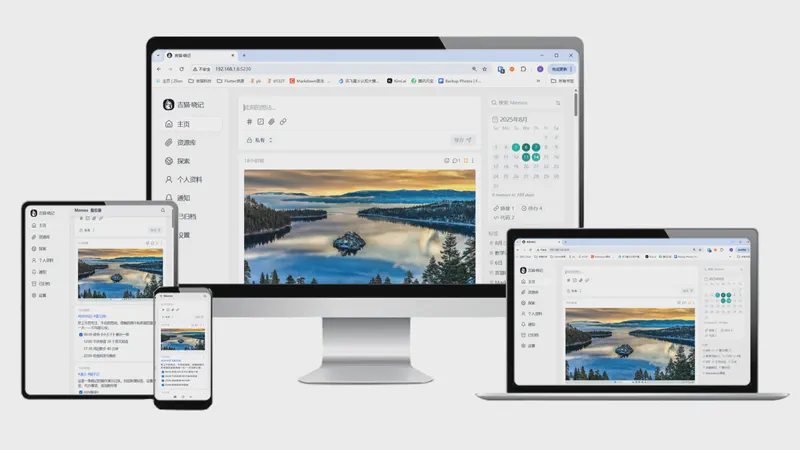
| Is it easy to use? | Zero threshold: Download → Open → Start taking notes immediately. Computer access via the same WIFI in 3 steps | Ready to use after registration, but multi-device sync requires a membership (e.g., Notion Free supports only 2 devices), limited export formats |
| Can it be used offline? | Fully usable: Create/edit notes and view history without internet | Partially usable: Only cached content is accessible, cannot create/edit new notes—syncing requires internet |
| Is data secure? | 100% secure: You control your data, support one-click export/backup, no data loss if app is uninstalled | Risky: Platform may review data, account suspension leads to inaccessibility, and leakage risk is borne by the platform |
Practical Experience Differences for Average Users
- Cost: Gimao Memos is free for unlimited notes and files; Evernote requires an annual membership (nearly ¥100) for more storage and multi-device sync.
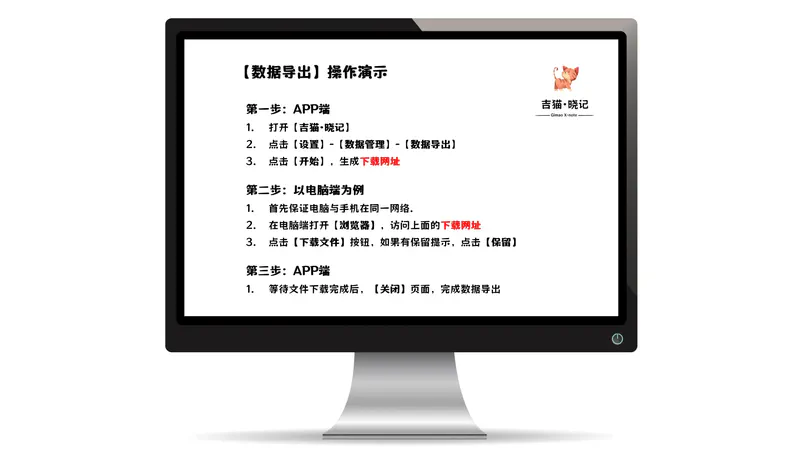
- Data Export: Gimao Memos generates a URL on your phone—download backups directly via computers on the same WIFI with universal file formats; Yuque Free only supports single-note export, which requires internet.
- Privacy Protection: For diaries, financial records, etc., Gimao Memos stores data only on your phone—no risk of platform access; SaaS cloud notes rely entirely on the platform for privacy, with occasional data leakage incidents reported.
2. Gimao Memos vs Lightweight Private Cloud Tools (Nextcloud, Synology NAS Note Features)
These tools focus on “data autonomy” but require extra device purchases and technical skills, making them unfriendly for average users.
Core Difference Comparison Table
| Comparison Dimension | Gimao Memos | Lightweight Private Cloud Tools (e.g., Nextcloud, Synology NAS) |
|---|---|---|
| Where is data stored? | Local to your phone—no extra devices needed | Requires separate NAS devices (¥1000-5000) or server rentals, data stored on devices/servers |
| How much does it cost? | Zero cost: Reuse old phones, no additional expenses | Moderate cost: NAS device fees + electricity, server rentals cost ¥200-1000/year |
| Is it easy to use? | Beginner-friendly: No setup required—open the app and use immediately. Computer access via the same WIFI | Technical skills needed: NAS initialization (e.g., Synology DSM setup) or VPS deployment (Docker commands), complex configurations for public network access |
| Can it be used offline? | Fully usable: Create/edit notes and view content without internet | Unusable offline: NAS requires local network, servers require public internet—no access without network |
| Is data secure? | Secure with no risks: No public network access, data only flows between your devices | Requires self-protection: Firewall setup and regular backups are necessary—data loss if devices fail |
Practical Experience Differences for Average Users
- Device Requirements: Gimao Memos works with old Android phones (e.g., unused Xiaomi/Huawei devices) with no extra purchases; Nextcloud requires a separate NAS (e.g., Synology DS220+ costs over ¥2000) or VPS rental.
- Operation Difficulty: Gimao Memos requires no technical knowledge—even elders can use it; lightweight private clouds need network setup and plugin installation via tutorials, with non-functional results if steps are wrong.
- Maintenance Cost: Gimao Memos requires no maintenance—automatic app updates; NAS needs regular storage cleaning and data backups, with no data recovery for non-technical users if devices fail.
IV. Comprehensive Comparison Table: Core Differences at a Glance
| Comparison Dimension | Gimao Memos | Traditional SaaS Cloud Notes | Lightweight Private Cloud Tools |
|---|---|---|---|
| Where is data stored? | Mobile phone local | Vendor cloud | NAS/Server |
| Long-term cost | ¥0 (Free + No extra devices) | ¥50-200/year (Membership) | ¥1000+ (Hardware/Rentals) |
| Offline usability | Fully supported | Partially supported (cached only) | Not supported |
| Technical threshold | Zero (3-step setup) | Low (Register and use) | High (Technical skills + setup) |
| Data security & backup | Secure, one-click export | Platform-dependent, limited export | Secure but requires manual backup |
| Target users | Average users, students, office workers | Users accepting subscriptions | Tech enthusiasts (programmers, IT admins) |
V. Selection Advice: Which Tool is Right for Average Users?
Based on the above comparison, Gimao Memos’ core value lies in “achieving data privatization with zero cost and zero technical threshold”. Choose it if:
- You want free use and value privacy: Gimao Memos stores data on your phone, is free, works offline, and meets daily note-taking and data storage needs;
- You need cross-public-network sync and don’t mind subscriptions: Traditional SaaS cloud notes (e.g., Notion) are an option, but you must accept cloud storage;
- You have technical skills and are willing to buy devices: Lightweight private cloud tools are available, but not recommended for average users due to high failure risks.
VI. Conclusion: Average Users Can Easily Own a “Private Cloud Note-Taking Tool”
For most people, the core needs of a note-taking tool are “free, easy to use, and secure”. Gimao Memos requires no complex setup or extra costs, turning your mobile phone into an “exclusive private cloud”. It solves the privacy and subscription fee issues of SaaS cloud notes while avoiding the technical barriers of lightweight private clouds.
No coding skills or device purchases required—download the app to gain 100% data sovereignty. This is the benefit of the Mobile-Hosted architecture for average users—allowing everyone to easily use a secure, free note-taking tool.